
Inventor AI
250+ AI Commands for Autodesk Inventor – Sheet Metal, Drawings & More
AI Controlling Autodesk Inventor Is No Longer a Concept. It’s Working. What we’ve built is not a demo. It’s not a toy. It’s a functioning Model Context…
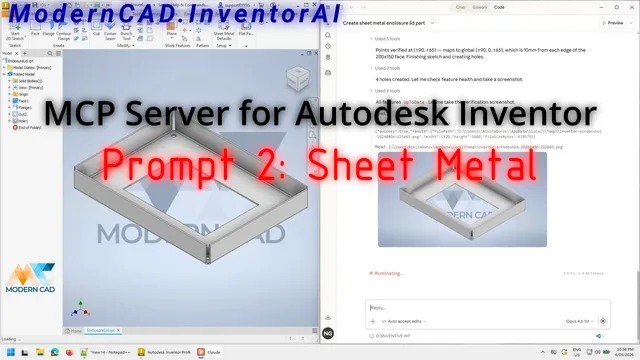
AI Controlling Autodesk Inventor Is No Longer a Concept. It’s Working.
What we’ve built is not a demo. It’s not a toy.
It’s a functioning Model Context Protocol (MCP) layer that enables AI to operate Autodesk Inventor in real-time – using language.
Under the hood, this solves a fundamental gap: AI works in words. Software works in commands. MCP is the bridge between the two.
It sits between the Inventor COM API and the LLM, translating intent into executable actions and making it possible for AI to discover, understand, and execute over 255 commands inside Inventor.
The Sheet Metal Demo
The example that got the most response on LinkedIn demonstrated sheet metal design capabilities.
As you could see in the video, AI created a new sheet metal part from scratch from a simple text request. Not from a template. Not from predefined parameters. From a description of what the part should be.
That includes:
- Creating the base feature (face or contour flange)
- Adding flanges on specified edges
- Applying bends with correct K-factor for the material
- Generating the flat pattern
- Exporting fabrication-ready DXF
But sheet metal is just one of eight major capability areas.
The Full Capability Breakdown
Here’s what 255 tools actually looks like, organised by domain:
1. Core Modelling (93 Tools)
Everything you need to create parts and features:
- Sketches: Lines, arcs, circles, rectangles, splines, slots, polygons, offset, trim, extend, mirror, project geometry
- Sketch Constraints: Coincident, collinear, concentric, tangent, perpendicular, parallel, horizontal, vertical, equal, fix
- Sketch Dimensions: Linear, angular, radial, diameter
- Features: Extrude, revolve, hole, fillet, chamfer, shell, sweep, loft, coil, rib, emboss, split, thicken
- Patterns: Rectangular, circular, sketch-driven, mirror
- Work Geometry: Work planes, axes, points
That’s your full parametric modelling toolkit, accessible through natural language.
2. Sheet Metal Fabrication (22 Tools)
The differentiated capability that no competitor offers:
- Design: Face flanges, contour flanges, hems, bends, folds, lofted flanges
- Finishing: Corner seam, corner round, corner chamfer
- Detection: Thin body detection (proven accurate to 0.1mm thickness)
- Conversion: Convert STEP imports to sheet metal
- Output: Unfold to flat pattern, export DXF
- Intelligence: K-factor suggestions based on material + thickness, bend allowance calculation, sheet metal rule management
For fabrication shops, this is the killer feature. One command: “Find all sheet metal parts in this assembly, unfold them, and export flat patterns as DXF.” Done. What used to take an hour takes 30 seconds.
3. Drawing & Annotation (41 Tools)
The workflow engineers hate most – automated:
- Views: Base, projected, section, detail, auxiliary, standard placement (front/top/right/iso)
- Dimensions: Linear, angular, radial, diameter, ordinate – with auto-placement
- Annotations: Balloons, centerlines, center marks, hole notes, thread notes, bend notes
- GD&T: Feature control frames, datum symbols, surface texture, weld symbols
- Tables: Parts list, hole table, revision table, custom tables
- Automation: Title block filling from iProperties, batch drawing generation from assemblies
Ask any engineer what they’d automate first. 90% say drawings. Now they can.
4. Assembly Management (~20 Tools)
- Component placement, copying, replacing
- Assembly constraints: mate, flush, angle, insert, tangent
- Joints (newer Inventor constraint type)
- BOM extraction
- Interference checking
- Component search and traversal
5. Analysis & Validation (18 Tools)
Quality checks that should happen but often don’t because they take too long manually:
- Mass properties (weight, volume, centre of gravity, surface area, bounding box)
- Wall thickness checking
- Draft angle checking
- Sharp edge detection
- Feature health audit
- Reference checking
- Interference analysis
6. Export (7 Formats + Batch)
- STEP, PDF, DWG, DXF, STL, SAT, IGES
- Single file or batch export for entire assembly trees
- Multiple formats in one command
7. Semantic Model & Knowledge Base (40 Tools)
The intelligence layer that makes this more than just automation:
- Tag faces and edges with semantic meaning during feature creation
- Query geometry by role, not just by index
- Search across indexed designs for parts with matching profiles
- Record and replay tool sequences
- Cross-file knowledge base in a DB
8. Configuration & Productivity (20+ Tools)
- User parameters with expressions and units
- Material management from Inventor library
- iLogic rule creation and execution
- Model states, iPart tables
- Batch iProperty setting
- Design review reports
The Feedback Loop
The AI doesn’t just execute blindly. It observes results, evaluates them against requirements, and refines.
This is what separates automation from assistance. An iLogic rule does exactly what you programmed, even if the result is wrong. Inventor AI checks its work – “Did the hole land on the right face? Is the dimension correct? Does the flat pattern unfold cleanly?”
Step by step, we’re moving towards AI-assisted engineering workflows – not just AI-automated button clicking.
Speed, Accuracy, and What’s Next
I’m now focused on three things:
- Speed – Making tool execution as fast as possible so the AI doesn’t feel like it’s waiting
- Accuracy – Reducing errors in complex multi-step workflows
- Expanding capability – Adding tools that early adopters request most
Get Early Access
If you want early access – now’s the time.
I’m onboarding a small group of engineers (20-30) who want to test Inventor AI on their real workflows. Free. No commitment. Just honest feedback.
Drop us a message on LinkedIn or email info@moderncad.com.au.
Continue reading