
Inventor AI
AI Controlling Autodesk Inventor – How MCP Makes It Possible
I’ve been building what I think is a world first… and it’s working. A powerful MCP server that enables any modern AI model to control Autodesk Inventor.…
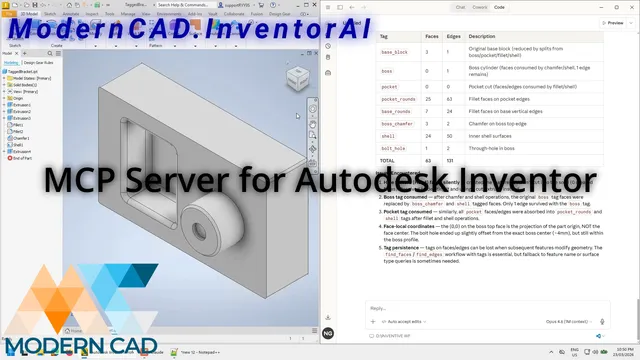
I’ve been building what I think is a world first… and it’s working.
A powerful MCP server that enables any modern AI model to control Autodesk Inventor.
Yes, people have talked about AI in engineering. Yes, there have been demos and proofs-of-concept. But I’ve got this working in real life, on real engineering workflows, with real Inventor models.
Let me explain what that actually means.
The Fundamental Problem: AI Speaks Words, Software Speaks Commands
Every engineer knows this frustration – you can describe what you want to a colleague in 30 seconds, but executing it in software takes 30 minutes of clicking through menus, placing dimensions, and filling in properties.
AI has the same problem. It understands language brilliantly. It can reason about engineering concepts. But it can’t click menus.
That’s what MCP solves.
What is MCP?
MCP – Model Context Protocol – is a standardised way for AI models to communicate with external tools. Think of it as a universal translator between AI and software.
I’ve built an MCP layer specifically for Autodesk Inventor. It sits between the AI (Claude, ChatGPT, Cursor – any MCP-compatible client) and Inventor’s COM API, translating natural language intent into executable CAD commands.
Once connected, the AI can discover available commands and operate Inventor directly.
This is potentially a world-first approach to enabling real-time, language-based control of Inventor.
What Can It Do Today?
Right now, with 255 purpose-built tools, Inventor AI can:
Modelling
- Create parts from text descriptions – sketches, extrusions, holes, fillets, patterns
- Manipulate assemblies – place components, apply constraints, check interference
- Handle sheet metal – flanges, bends, unfold to flat pattern, export DXF
Drawing & Documentation
- Generate complete engineering drawings from parts or assemblies
- Auto-place views (front, top, right, isometric, section, detail)
- Add dimensions, annotations, GD&T, centerlines, balloons
- Fill title blocks from iProperties
- Batch-generate drawings for entire assembly trees
Automation & Productivity
- Batch export to STEP, PDF, DWG, DXF, STL, SAT, IGES
- Batch flat pattern export for sheet metal assemblies
- BOM extraction and iProperty verification
- Design validation – wall thickness, draft angle, interference
Intelligence
- Tag geometry semantically during feature creation
- Search across indexed designs for similar parts
- Record and replay tool sequences
- Cross-file knowledge base queries
The Feedback Loop
This is the part that excites me most. The AI doesn’t just execute commands blindly – it can observe the result, evaluate whether it meets the requirement, and adjust.
So instead of operating software… you’re directing its intent.
It sees the model. It checks dimensions. It identifies problems. It refines until the output matches what you described.
We’re moving from automation (do this specific thing) to assistance (achieve this outcome).
A Note on Prompts
If you’ve seen the demo, you’ll notice the prompt is relatively simple – a numbered list of steps for the MCP to execute. Doesn’t look particularly sophisticated, right?
That’s intentional. I use those step-by-step prompts mostly for testing – making sure each tool works correctly, validating the sequence, confirming the output. It’s like a checklist. Do this, then this, then this. Useful for development, but not really how you’d design a part.
The real power shows up when you stop spelling out the steps and let the AI figure out the sequence on its own. I’ve already tested more sophisticated prompts where you describe the outcome – the geometry, the constraints, the intent – and the AI works out which tools to call, in what order, with what parameters.
That’s where it gets interesting. And that’s what I’ll be showing in the next posts.
What’s Next
It’s still early days. I’m focused on speed and accuracy – making sure every tool works reliably and the AI can handle complex, multi-step workflows without hand-holding.
I’m also putting together a small group of early adopters – engineers who want to be the first to use AI-powered Inventor workflows in their real work.
If you’re interested in being one of those early users, get in touch.
Tech moves fast. I’d love to help you be first.
Want to See It in Action?
If you’re curious about how MCP could fit into your Inventor workflows – or you’d like to test it on your own models – I’d love to hear from you.
Drop us a message on LinkedIn or email info@moderncad.com.au. No pitch, no pressure – just a conversation about what’s possible.
Continue reading