
Design Gear – Configurator for Autodesk Inventor
One product, a thousand options – every configuration designs itself.
Design Gear turns your product's options into zero-code rules that live inside the Autodesk Inventor file itself. Pick the options and everything follows: model, drawings, BOM, STEP. And it's fully AI-integrated – describe the product to your AI session and the configurator is built, configured and tested for you.
It lives inside Inventor
Design Gear is a shadow application: it sits inside the desktop Inventor you already run, watches everything happening in the document, and reacts the moment something needs to update. Three kinds of moving parts do the work.
Rules
Look after the document
Rules live inside the Inventor file, keeping every design consistent. Components, dimensions, materials and configurations update automatically based on your selections. Because the rules travel with the file, every design follows the same standards.
Jobs
Produce the paperwork
Generate everything you need in one step. Create drawings, PDFs, DXFs, STEP files, BOMs, renders and customer documents from a single configured model. No manual exports or repetitive admin.
Tools
Help prepare the configurator
Build and test product configurators faster. Clone assemblies, relink references, package models for the cloud and test web configurations before publishing. Your design tools stay separate from the finished model.
Sound familiar?
If you make configured-to-order products in Inventor, you've probably lived all four.
“By the time the quote went out, someone else had already won the job.”
Every configured quote is a mini engineering project queued behind the design team: open Inventor, adjust, fix what breaks, build the BOM, price it in Excel. For a made-to-order manufacturer that's not a scheduling problem – it's a lost order.
“We need a designer who can also code. Good luck finding one.”
Building a configurator has always meant blending 3D models with programming. Two different professions, two different educations, two different career paths – people who are genuinely good at both barely exist.
“What happens when that one developer leaves?”
The question that kills configurator projects before they start. Even when one gets built, it's a blend of models and code only its author understands – and managers won't bet budget on something one resignation can strand.
“The iLogic broke on the Inventor upgrade. Again.”
Automation that worked last year throws errors this year, and nobody wants to touch the black box. An asset that needs constant rescue isn't an asset.
What changes when the intelligence lives in the file
- A customer's requirements become ticking boxes instead of redrawing. Change the parameters and everything follows: model, drawings, BOM, DXF, STEP.
- The quote pack goes out the same day.
- At the shops running it, sales handles the standard jobs and the configuration engineer keeps the exceptions – and stops being the bottleneck everyone queues behind.
- The rules only allow combinations your designers approved, so an invalid configuration can't be ordered.
- The rules live inside the Inventor file itself. They survive renames, copies, Inventor upgrades – and resignations.
- Need a new rule? Say the word. Design Gear is fully AI-integrated: describe the rule in your AI session and it's built in the document, configured and tested to do exactly what's required.
- Publish the same model to the web, and customers configure in 3D and order through your site. The store never sleeps.
Rules. Configure. Publish.
Three steps – and the third one is optional until you want it.
Step 1
Rules
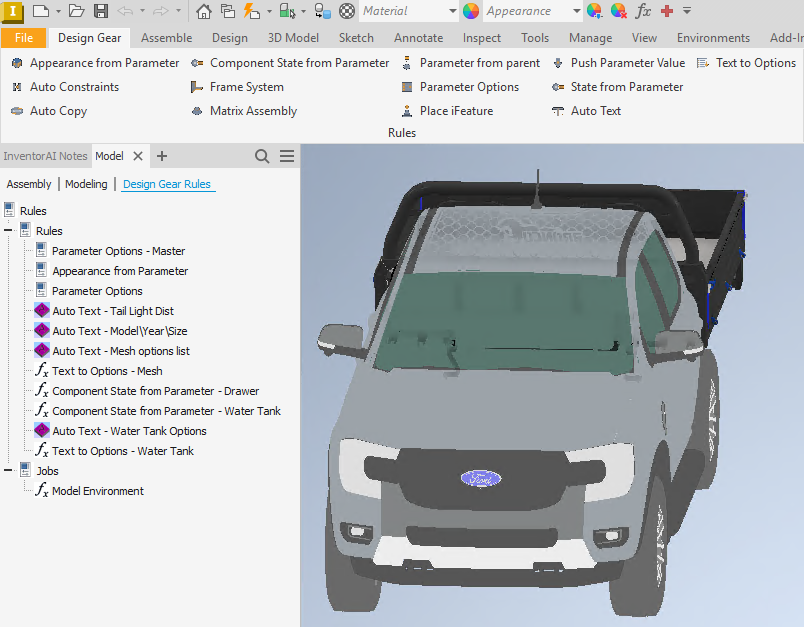
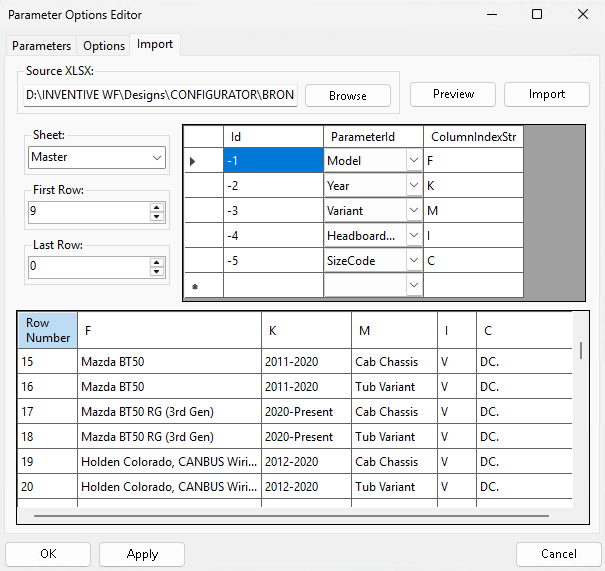
Your product experts – the people who actually know the product – set up the configuration logic from reusable rules: option tables imported straight from Excel that filter every dependent choice, components that appear or swap with a selection, appearances that follow the pick, part numbers and descriptions that write themselves. Configured through dialogs, not coded. Or just describe it: your AI session creates the rules in the document, configures them and tests that the configurator does exactly what's required. Your existing iLogic keeps working alongside; migration is gradual, not a rewrite.
Step 2
Configure
From then on, a variant is a set of choices. The rules live inside the document and react to every change – option lists update, sub-assemblies switch on and off, part numbers regenerate. Then the jobs take over, before or after the update: drawings, PDF, Excel BOM, flat-pattern DXF, STEP and renders in one pass – each output tagged for its audience, so sales gets the quote pack and the workshop gets the cut files. A simple change in the parameters updates the entire design – including the drawings.
Step 3
Publish
When you're ready to sell it the modern way, the same rules run headless on a server – configurations generate autonomously, with nobody at a desk. There are two ways to publish. The internal sales portal puts the configurator in front of your own sales engineers, who configure for the customer with the 3D model live. Or you integrate with your online store, so customers configure and order themselves, around the clock. The store route is simpler than it sounds: a WooCommerce site just needs the Design Gear plugin installed, and the integration is set up through settings – no coding, and nobody with development skills required. Delivered with us either way – we set it up together, on your models.
A real product configured in a browser, live – our own worked example, not a customer site.
Fully AI-integrated
Building the configurator used to be the hard part. Now it's a conversation.
Just ask your AI session to build a configurator for you, and to follow your business rules. Design Gear in combination with Inventor AI builds the model – and every result lands where you can see it: inside the Inventor document.
1 · Describe
Start from any finished design
Point the session at a model your team already builds and say what should be configurable – lengths, options, materials, the combinations you actually sell. Through Inventor AI the session reads the structure and parameters and knows what it's working with, including any configurators you've already authored.
2 · Watch it build
Rules written into the document
The session attaches Design Gear rules, wires up the option logic and dependency tables, then runs the configurator and tests that it does exactly what you asked – changing options, checking the cascade, correcting what doesn't hold. What used to take a specialist weeks now takes a fraction of that.
3 · Approve
Your designers stay the authority
What lands is the same zero-code rules a designer builds by hand – readable, editable, stored in the file. Your team reviews, adjusts and approves; nothing ships that they can't open and own. The AI sees your words and its own check screenshots, never your model files.
Design Gear and Inventor AI are built to run in the same session: one gives the AI the whole of Inventor, the other gives it the rule engine. Design the part with one, turn it into a product with the other – no export, no hand-over, one conversation.
How far do you take it?
For some companies Design Gear is simply a design automation tool – and that's a complete product on its own. For those who sell configurable products, there are two pathways to sell, and a portal that closes the loop with production.
The Inventor add-in
Design automation on the desktop
Rules, jobs and tools automate the variants your team already designs every week – model, drawings, BOM and exports flowing from one parameter change. Plenty of shops stop right here, and it pays for itself without a single thing sold online.
The sales portal
Internal sales configure for their customers
Made-to-order products – steel water tanks, conveyors, sheds – are different on every project, and it's internal sales who gather the requirements. Sales engineers log into the portal, pick the product, configure the project, export the document pack and share the 3D view with the customer. No Inventor seat, no queue behind engineering.
Integration with e-commerce
Consumers order straight from the website
Customers configure the product in 3D on your own store and place the order, around the clock – the price follows their choices, driven by your own pricelists. Integration with WooCommerce is available today, and Shopify is on the roadmap. Behind the scenes Design Gear runs headless, generating configurations on the server into a ready-made cache – so the online experience stays instant.
The manufacturing portal
Production closes the loop
Manufacturing receives its jobs – detailed drawings exported straight from the model – and reports progress back. So when a customer orders online, they can see exactly where their order is.
The questions owners and engineers ask
What does a quote cost you today?
Bring your most-configured product and the last quote that took too long. We'll tell you honestly whether Design Gear fits – and show you the same job done by ticking boxes.
Request access